Showing posts with label recovery. Show all posts

Wednesday, August 25, 2010

Deleted File Recovery in Liunx - PhotoRec

PhotoRec is great tool for recover deleted files in Linux

PhotoRec is a data recovery software tool designed to recover lost files from digital camera memory (CompactFlash, Memory Stick, Secure Digital, SmartMedia, Microdrive, MMC, USB flash drives etc.), hard disks and CD-ROMs. It recovers most common photo formats, including JPEG, and also recovers audio files including MP3, document formats such as Open Office, Microsoft Office, PDF and HTML, and archive formats including ZIP.
PhotoRec does not attempt to write to the damaged media you are about to recover from. Recovered files are instead written to the directory from where you are running PhotoRec or any other directory you choose. PhotoRec is shipped with TestDisk.

Here steps for recover lost data:

Step 1 : As a root user, install PhotoRec by "yum install photorec" in RedHat Linux. After install type photorec in terminal window


Step2 : You'll get following screen


Step 3 : Here want to choose hard disk, Hit Enter for proceed, You'll get following,


Step 4 : Choose partition table type, Our normal table type is Intel ( Normally we using this only ). Next you'll get following page,


 Step 6 : Hit Search for go to next step, Hit options for advanced options, Hit File Opt for choose specified file type recovery.


Step 7 : After Hit Search , you'll get following window. This for choose file system type.This is one of useful option for linux file system,


Step 8 : Now want to choose place for store recoverd files, Don't use same partition for store files. This'll corrupted files and can't recover file successfully.


After completion of file recovery,Open destination directory and get files. Wait until file recovery completion.


By this i have successfully restored lost files. Use it by your one risk. Hope you can successfully restore your lost data. 

Please go PhotoRec official page for more information.

Recover Lost Partitions in Linux - TestDisk

TestDisk is great tool for recover lost partitions in Linux

TestDisk is a free data recovery utility. It was primarily designed to help recover lost data storage partitions and/or make non-booting disks boot-able again when these symptoms are caused by faulty software, certain types of viruses or human error (such as accidentally erasing a partition table).

Here steps for recover lost partition:

Step 1 : As a root user, install testdisk by "yum install testdisk" in RedHat Linux. Type testdisk in terminal.


Step2 : You'll get following screen


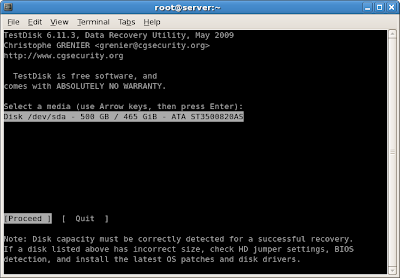
Step 3 : Use options for create or skip log files, After that you get following screen. Here we want to choose hard disk for recover lost partition,


Step 4 : Here i use single hard disk, Hit Enter for proceed, You'll get following


Step 5 : Choose partition table type, Our normal table type is Intel ( Normally we using this only ). Next you'll get following page,


 Step 6 : Use options for choose our need, Analyse'll show you list of partition


Step 7 : Hit Enter for Quick Search , This'll analyse our Hard Disk, This process is as shown in figure,


After completion of this, It'll show all partition as available.

By this i have successfully restored lost partitions. Use it by your one risk. Hope you can successfully restore your lost partitions. 

Please go TestDisk official page for more information.